Notate PDF for Intune26.0.1
Publisher Description
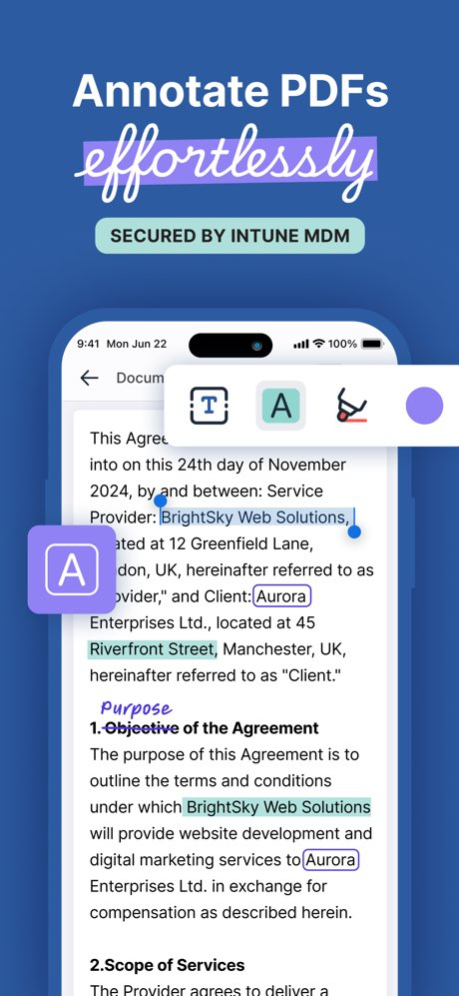


NOTATE PDF - THE SECURE MOBILE WORKSPACE FOR REGULATED TEAMS
IMPORTANT NOTE:
Notate is designed for enterprise deployment via Intune MDM, or MAM platforms. The app will not function without backend configuration by your organization.
WHY NOTATE PDF?
Edit and Annotate Securely - Online or Offline
Work with PDFs and Microsoft Office files using advanced editing, annotation, and collaboration tools - all within a fully managed, secure mobile workspace.
Built for Enterprise Workflows
Seamlessly access, edit, and organize files from Exchange, Teams, SharePoint, SMB, and more. Notate is used by leading organizations in finance, healthcare, and government.
Secure by Design
All data remains encrypted and contained within your corporate network. No third-party cloud. No data leakage. Full support for Intune app protection and conditional access policies.
KEY FEATURES
. Edit PDFs and Office Documents
Modify text, add comments, split or merge pages, and redact sensitive data. Create new documents or annotate existing ones in one unified experience.
. Sign and Approve Documents
Add legally binding digital signatures to contracts, forms, and compliance documents.
. Collaborate in Context
Share annotated documents and use threaded comments for feedback. Eliminate the back-and-forth of scattered reviews.
. Scan, Search, and Capture
Digitize paper documents with OCR scanning. Convert to searchable PDFs and attach to secure repositories or email.
. Take Notes Your Way
Handwrite, type, or draw with full Apple Pencil support. Organize content with rich formatting, embedded media, and folders.
. Deploy with Confidence
Direct integration with BlackBerry UEM enforces security, compliance, and access policies - ensuring data containment and enterprise control.
TRUSTED ACROSS INDUSTRIES
. 8 of the top 20 global banks
. Top-tier insurance providers
. Multibillion-dollar healthcare networks
. Government and public sector agencies
EXPERIENCE THE FUTURE OF SECURE MOBILE PRODUCTIVITY
Download Notate PDF and empower your mobile teams to collaborate with confidence - no matter where they work.
Version History Notate 2026: All your files. One workspace.
The largest release in Notate's history. Everything you work with now lives in one place, under the same IT controls your organization already has.
ONE FILE MANAGER FOR EVERYTHING
Browse, open, and edit files from every source in a single place: Notate Drive, OneDrive, SharePoint, Teams, ShareFile, network (SMB) shares, and email attachments. Move and copy files between them.
BUILT FOR MICROSOFT 365
SharePoint Embedded support brings noticeably faster syncing and a private document workspace that lives inside your own Microsoft tenant, governed by your existing Purview retention, DLP, and compliance policies. Your IT team keeps the same controls it has today.
SEARCH ACROSS ALL YOUR DRIVES
Search a folder, a drive, or everything at once, with matching text snippets displayed right in the results.
AI ASSISTANT
Ask questions about a document, summarize long PDFs, turn meeting audio into structured notes, and get help writing, transcribing, and cleaning up handwritten notes. The assistant runs inside your organization's own Microsoft environment, so your documents and prompts never leave your tenant. Available where enabled by your organization.
SHARING
Share notes and folders with colleagues, see what's been shared with you, and get an unread badge in the sidebar when something new arrives.
COMPARE VERSIONS (iPad)
View a previous version of a PDF alongside the current one and restore it with a tap.
EMAIL WITHOUT THE ROUND TRIP
Open an attachment, mark it up, and reply with the updated file without ever leaving Notate.
OFFICE DOCUMENTS
Open and edit Word, Excel, and PowerPoint files in Microsoft Office or with the built-in Notate Office editor.
TEMPLATES
Start a new note, PDF, or Office document from the template gallery, or save any file as a template.
ALSO NEW
Favorites, Recents, and Offline. Star files and folders for quick access, jump back to recently opened documents, and mark items for offline use.
Multi-select. Select multiple files at once to move, copy, share, delete, or make them available offline.
Redesigned interface. A refreshed experience across the file manager, previewer, and Settings, including sortable column views on iPhone.
Accounts. A simpler account screen with per-account Reconnect and a single Sign Out that fully clears the device.
Network shares. Connect to SMB servers by name, sign in with Kerberos single sign-on, and confirm your setup with Test Connection.
Plus many fixes for sync reliability and performance. 26.0.1 Sep 11 Notate 2026: All your files. One workspace.
The largest release in Notate's history. Everything you work with now lives in one place, under the same IT controls your organization already has.
ONE FILE MANAGER FOR EVERYTHING
Browse, open, and edit files from every source in a single place: Notate Drive, OneDrive, SharePoint, Teams, ShareFile, network (SMB) shares, and email attachments. Move and copy files between them.
BUILT FOR MICROSOFT 365
SharePoint Embedded support brings noticeably faster syncing and a private document workspace that lives inside your own Microsoft tenant, governed by your existing Purview retention, DLP, and compliance policies. Your IT team keeps the same controls it has today.
SEARCH ACROSS ALL YOUR DRIVES
Search a folder, a drive, or everything at once, with matching text snippets displayed right in the results.
AI ASSISTANT
Ask questions about a document, summarize long PDFs, turn meeting audio into structured notes, and get help writing, transcribing, and cleaning up handwritten notes. The assistant runs inside your organization's own Microsoft environment, so your documents and prompts never leave your tenant. Available where enabled by your organization.
SHARING
Share notes and folders with colleagues, see what's been shared with you, and get an unread badge in the sidebar when something new arrives.
COMPARE VERSIONS (iPad)
View a previous version of a PDF alongside the current one and restore it with a tap.
EMAIL WITHOUT THE ROUND TRIP
Open an attachment, mark it up, and reply with the updated file without ever leaving Notate.
OFFICE DOCUMENTS
Open and edit Word, Excel, and PowerPoint files in Microsoft Office or with the built-in Notate Office editor.
TEMPLATES
Start a new note, PDF, or Office document from the template gallery, or save any file as a template.
ALSO NEW
Favorites, Recents, and Offline. Star files and folders for quick access, jump back to recently opened documents, and mark items for offline use.
Multi-select. Select multiple files at once to move, copy, share, delete, or make them available offline.
Redesigned interface. A refreshed experience across the file manager, previewer, and Settings, including sortable column views on iPhone.
Accounts. A simpler account screen with per-account Reconnect and a single Sign Out that fully clears the device.
Network shares. Connect to SMB servers by name, sign in with Kerberos single sign-on, and confirm your setup with Test Connection.
Plus many fixes for sync reliability and performance. 26.0 Sep 8 Resolved an issue where password-protected PDFs could not be edited. 8.3.1 10/11/2025 We’ve made Notate even better in this update:
• SMB support – Seamlessly connect to your organization’s file shares for easy access and editing
• iOS 26 compatibility – Fully optimized to take advantage of the latest iOS improvements
• Latest Intune SDK – Enhanced security and management for enterprise users with the newest Microsoft Intune integration
As always, we’ve also made performance improvements and fixed minor bugs to keep your experience smooth. 8.3.0 10/06/2025 • Support for digitally signing PDF documents using user certificates. These signatures are legally binding and tied to your verified identity.
• You can now create new folders and upload files directly to repositories such as OneDrive.
• New administrative control to restrict the conversion of Office documents to PDF.
• Various bug fixes and performance improvements. 8.2.5 04/08/2025 Updating Intune SDK to v. 20.2.1 - allows blocking of some writing tools 8.2.3 12/11/2024 Fixing issue with MSAL Authentication 8.2.2 11/02/2024 Fresh clean interface for document editing, makes PDF editing and signing fast and easy! 8.2.1 10/31/2024 Fixes an issue where configuration is not properly being returned from Intune 8.1.2 08/20/2024 * Added support for Secure PDF Redaction
* Added support for PDF Content Editing
* Added Intune SDK new common protocol 8.1.1 06/17/2024 Fixing an occasional crash when processing in the background. 7.5.1 09/29/2023 Updated Intune SDK 7.5.0 09/22/2023 Improvements to business card scanning and PDF editing. 7.4.9 08/24/2023 Fixed crashing bug. Improvements to card scanning. 7.4.8 07/31/2023 Fixes a problem that prevented Open-In from working on iOS 16
Includes latest Intune SDK 7.4.2 11/20/2022 iOS 16 support
Bug fixes and performance improvements
ability to open notes even while syncing is occurring 7.4 10/27/2022 Improved PDF support
Microsoft MSAL library updated
Bug fixes 7.3.6 05/28/2022 Notate now supports Intune/Azure zero trust conditional access by registering Notate as a policy protected application. 7.3.5 03/15/2022 - Added support for Microsoft OneDrive repository
- Rich PDF editing for documents on OneDrive
- OneDrive documents can imported into notes
- “Open In” is now back at the top level on the toolbar
- PDF Pages can now be copied and pasted between notes in Notate for Intune
- Updated to Intune 15.1 SDK
- Minor bug fixes 7.3 12/07/2021 iOS 15 Support
Added templates for creating blank PDF notes
Email attachments now sync much more quickly
Fixed problem editing password protected PDF files
Added warnings for users if sync hasn’t been working for more than 24 hours
Updated Modern Auth to Exchange 365
Updated Intune SDK
Added ability to rename PDF files directly from editor
Minor bug fixes 7.2 10/18/2021 Fixed an issue which was causing delayed handwriting performance.
Fixed a crash when exporting a document from the PDF editor. 6.9.9 08/18/2021 Minor bug fixes. 6.9.8 06/24/2021 Improvements to PDF rendering and editing.
Fixes PDF crash when inserting comments. 6.9.7 06/05/2021 Updated to latest Intune SDK
"Open-In" now works with Intune Policy managed apps with Open-In/Share filtering 6.9.6 05/21/2021 Includes Intune SDK 14.1.3 which fixes an issue blocking Intune login in some cases. 6.9.5 03/10/2021
About Notate PDF for Intune
The company that develops Notate PDF for Intune is Shafer Systems LLC. The latest version released by its developer is 26.0.1.
To install Notate PDF for Intune on your iOS device, just click the green Continue To App button above to start the installation process. The app is listed on our website since 2026-10-08 and was downloaded 8 times. We have already checked if the download link is safe, however for your own protection we recommend that you scan the downloaded app with your antivirus. Your antivirus may detect the Notate PDF for Intune as malware if the download link is broken.
How to install Notate PDF for Intune on your iOS device:
- Click on the Continue To App button on our website. This will redirect you to the App Store.
- Once the Notate PDF for Intune is shown in the iTunes listing of your iOS device, you can start its download and installation. Tap on the GET button to the right of the app to start downloading it.
- If you are not logged-in the iOS appstore app, you'll be prompted for your your Apple ID and/or password.
- After Notate PDF for Intune is downloaded, you'll see an INSTALL button to the right. Tap on it to start the actual installation of the iOS app.
- Once installation is finished you can tap on the OPEN button to start it. Its icon will also be added to your device home screen.
Program Details
System requirements
Download information
Pricing
Version History
version 26.0.1
posted on 2026-10-08
Version History Notate 2026: All your files. One workspace.
The largest release in Notate's history. Everything you work with now lives in one place, under the same IT controls your organization already has.
ONE FILE MANAGER FOR EVERYTHING
Browse, open, and edit files from every source in a single place: Notate Drive, OneDrive, SharePoint, Teams, ShareFile, network (SMB) shares, and email attachments. Move and copy files between them.
BUILT FOR MICROSOFT 365
SharePoint Embedded support brings noticeably faster syncing and a private document workspace that lives inside your own Microsoft tenant, governed by your existing Purview retention, DLP, and compliance policies. Your IT team keeps the same controls it has today.
SEARCH ACROSS ALL YOUR DRIVES
Search a folder, a drive, or everything at once, with matching text snippets displayed right in the results.
AI ASSISTANT
Ask questions about a document, summarize long PDFs, turn meeting audio into structured notes, and get help writing, transcribing, and cleaning up handwritten notes. The assistant runs inside your organization's own Microsoft environment, so your documents and prompts never leave your tenant. Available where enabled by your organization.
SHARING
Share notes and folders with colleagues, see what's been shared with you, and get an unread badge in the sidebar when something new arrives.
COMPARE VERSIONS (iPad)
View a previous version of a PDF alongside the current one and restore it with a tap.
EMAIL WITHOUT THE ROUND TRIP
Open an attachment, mark it up, and reply with the updated file without ever leaving Notate.
OFFICE DOCUMENTS
Open and edit Word, Excel, and PowerPoint files in Microsoft Office or with the built-in Notate Office editor.
TEMPLATES
Start a new note, PDF, or Office document from the template gallery, or save any file as a template.
ALSO NEW
Favorites, Recents, and Offline. Star files and folders for quick access, jump back to recently opened documents, and mark items for offline use.
Multi-select. Select multiple files at once to move, copy, share, delete, or make them available offline.
Redesigned interface. A refreshed experience across the file manager, previewer, and Settings, including sortable column views on iPhone.
Accounts. A simpler account screen with per-account Reconnect and a single Sign Out that fully clears the device.
Network shares. Connect to SMB servers by name, sign in with Kerberos single sign-on, and confirm your setup with Test Connection.
Plus many fixes for sync reliability and performance. 26.0.1 Sep 11 Notate 2026: All your files. One workspace.
The largest release in Notate's history. Everything you work with now lives in one place, under the same IT controls your organization already has.
ONE FILE MANAGER FOR EVERYTHING
Browse, open, and edit files from every source in a single place: Notate Drive, OneDrive, SharePoint, Teams, ShareFile, network (SMB) shares, and email attachments. Move and copy files between them.
BUILT FOR MICROSOFT 365
SharePoint Embedded support brings noticeably faster syncing and a private document workspace that lives inside your own Microsoft tenant, governed by your existing Purview retention, DLP, and compliance policies. Your IT team keeps the same controls it has today.
SEARCH ACROSS ALL YOUR DRIVES
Search a folder, a drive, or everything at once, with matching text snippets displayed right in the results.
AI ASSISTANT
Ask questions about a document, summarize long PDFs, turn meeting audio into structured notes, and get help writing, transcribing, and cleaning up handwritten notes. The assistant runs inside your organization's own Microsoft environment, so your documents and prompts never leave your tenant. Available where enabled by your organization.
SHARING
Share notes and folders with colleagues, see what's been shared with you, and get an unread badge in the sidebar when something new arrives.
COMPARE VERSIONS (iPad)
View a previous version of a PDF alongside the current one and restore it with a tap.
EMAIL WITHOUT THE ROUND TRIP
Open an attachment, mark it up, and reply with the updated file without ever leaving Notate.
OFFICE DOCUMENTS
Open and edit Word, Excel, and PowerPoint files in Microsoft Office or with the built-in Notate Office editor.
TEMPLATES
Start a new note, PDF, or Office document from the template gallery, or save any file as a template.
ALSO NEW
Favorites, Recents, and Offline. Star files and folders for quick access, jump back to recently opened documents, and mark items for offline use.
Multi-select. Select multiple files at once to move, copy, share, delete, or make them available offline.
Redesigned interface. A refreshed experience across the file manager, previewer, and Settings, including sortable column views on iPhone.
Accounts. A simpler account screen with per-account Reconnect and a single Sign Out that fully clears the device.
Network shares. Connect to SMB servers by name, sign in with Kerberos single sign-on, and confirm your setup with Test Connection.
Plus many fixes for sync reliability and performance. 26.0 Sep 8 Resolved an issue where password-protected PDFs could not be edited. 8.3.1 10/11/2025 We’ve made Notate even better in this update:
• SMB support – Seamlessly connect to your organization’s file shares for easy access and editing
• iOS 26 compatibility – Fully optimized to take advantage of the latest iOS improvements
• Latest Intune SDK – Enhanced security and management for enterprise users with the newest Microsoft Intune integration
As always, we’ve also made performance improvements and fixed minor bugs to keep your experience smooth. 8.3.0 10/06/2025 • Support for digitally signing PDF documents using user certificates. These signatures are legally binding and tied to your verified identity.
• You can now create new folders and upload files directly to repositories such as OneDrive.
• New administrative control to restrict the conversion of Office documents to PDF.
• Various bug fixes and performance improvements. 8.2.5 04/08/2025 Updating Intune SDK to v. 20.2.1 - allows blocking of some writing tools 8.2.3 12/11/2024 Fixing issue with MSAL Authentication 8.2.2 11/02/2024 Fresh clean interface for document editing, makes PDF editing and signing fast and easy! 8.2.1 10/31/2024 Fixes an issue where configuration is not properly being returned from Intune 8.1.2 08/20/2024 * Added support for Secure PDF Redaction
* Added support for PDF Content Editing
* Added Intune SDK new common protocol 8.1.1 06/17/2024 Fixing an occasional crash when processing in the background. 7.5.1 09/29/2023 Updated Intune SDK 7.5.0 09/22/2023 Improvements to business card scanning and PDF editing. 7.4.9 08/24/2023 Fixed crashing bug. Improvements to card scanning. 7.4.8 07/31/2023 Fixes a problem that prevented Open-In from working on iOS 16
Includes latest Intune SDK 7.4.2 11/20/2022 iOS 16 support
Bug fixes and performance improvements
ability to open notes even while syncing is occurring 7.4 10/27/2022 Improved PDF support
Microsoft MSAL library updated
Bug fixes 7.3.6 05/28/2022 Notate now supports Intune/Azure zero trust conditional access by registering Notate as a policy protected application. 7.3.5 03/15/2022 - Added support for Microsoft OneDrive repository
- Rich PDF editing for documents on OneDrive
- OneDrive documents can imported into notes
- “Open In” is now back at the top level on the toolbar
- PDF Pages can now be copied and pasted between notes in Notate for Intune
- Updated to Intune 15.1 SDK
- Minor bug fixes 7.3 12/07/2021 iOS 15 Support
Added templates for creating blank PDF notes
Email attachments now sync much more quickly
Fixed problem editing password protected PDF files
Added warnings for users if sync hasn’t been working for more than 24 hours
Updated Modern Auth to Exchange 365
Updated Intune SDK
Added ability to rename PDF files directly from editor
Minor bug fixes 7.2 10/18/2021 Fixed an issue which was causing delayed handwriting performance.
Fixed a crash when exporting a document from the PDF editor. 6.9.9 08/18/2021 Minor bug fixes. 6.9.8 06/24/2021 Improvements to PDF rendering and editing.
Fixes PDF crash when inserting comments. 6.9.7 06/05/2021 Updated to latest Intune SDK
"Open-In" now works with Intune Policy managed apps with Open-In/Share filtering 6.9.6 05/21/2021 Includes Intune SDK 14.1.3 which fixes an issue blocking Intune login in some cases. 6.9.5 03/10/2021
version 26.0.1
posted on 2026-09-17
Version History Notate 2026: All your files. One workspace.
The largest release in Notate's history. Everything you work with now lives in one place, under the same IT controls your organization already has.
ONE FILE MANAGER FOR EVERYTHING
Browse, open, and edit files from every source in a single place: Notate Drive, OneDrive, SharePoint, Teams, ShareFile, network (SMB) shares, and email attachments. Move and copy files between them.
BUILT FOR MICROSOFT 365
SharePoint Embedded support brings noticeably faster syncing and a private document workspace that lives inside your own Microsoft tenant, governed by your existing Purview retention, DLP, and compliance policies. Your IT team keeps the same controls it has today.
SEARCH ACROSS ALL YOUR DRIVES
Search a folder, a drive, or everything at once, with matching text snippets displayed right in the results.
AI ASSISTANT
Ask questions about a document, summarize long PDFs, turn meeting audio into structured notes, and get help writing, transcribing, and cleaning up handwritten notes. The assistant runs inside your organization's own Microsoft environment, so your documents and prompts never leave your tenant. Available where enabled by your organization.
SHARING
Share notes and folders with colleagues, see what's been shared with you, and get an unread badge in the sidebar when something new arrives.
COMPARE VERSIONS (iPad)
View a previous version of a PDF alongside the current one and restore it with a tap.
EMAIL WITHOUT THE ROUND TRIP
Open an attachment, mark it up, and reply with the updated file without ever leaving Notate.
OFFICE DOCUMENTS
Open and edit Word, Excel, and PowerPoint files in Microsoft Office or with the built-in Notate Office editor.
TEMPLATES
Start a new note, PDF, or Office document from the template gallery, or save any file as a template.
ALSO NEW
Favorites, Recents, and Offline. Star files and folders for quick access, jump back to recently opened documents, and mark items for offline use.
Multi-select. Select multiple files at once to move, copy, share, delete, or make them available offline.
Redesigned interface. A refreshed experience across the file manager, previewer, and Settings, including sortable column views on iPhone.
Accounts. A simpler account screen with per-account Reconnect and a single Sign Out that fully clears the device.
Network shares. Connect to SMB servers by name, sign in with Kerberos single sign-on, and confirm your setup with Test Connection.
Plus many fixes for sync reliability and performance. 26.0.1 5d ago Notate 2026: All your files. One workspace.
The largest release in Notate's history. Everything you work with now lives in one place, under the same IT controls your organization already has.
ONE FILE MANAGER FOR EVERYTHING
Browse, open, and edit files from every source in a single place: Notate Drive, OneDrive, SharePoint, Teams, ShareFile, network (SMB) shares, and email attachments. Move and copy files between them.
BUILT FOR MICROSOFT 365
SharePoint Embedded support brings noticeably faster syncing and a private document workspace that lives inside your own Microsoft tenant, governed by your existing Purview retention, DLP, and compliance policies. Your IT team keeps the same controls it has today.
SEARCH ACROSS ALL YOUR DRIVES
Search a folder, a drive, or everything at once, with matching text snippets displayed right in the results.
AI ASSISTANT
Ask questions about a document, summarize long PDFs, turn meeting audio into structured notes, and get help writing, transcribing, and cleaning up handwritten notes. The assistant runs inside your organization's own Microsoft environment, so your documents and prompts never leave your tenant. Available where enabled by your organization.
SHARING
Share notes and folders with colleagues, see what's been shared with you, and get an unread badge in the sidebar when something new arrives.
COMPARE VERSIONS (iPad)
View a previous version of a PDF alongside the current one and restore it with a tap.
EMAIL WITHOUT THE ROUND TRIP
Open an attachment, mark it up, and reply with the updated file without ever leaving Notate.
OFFICE DOCUMENTS
Open and edit Word, Excel, and PowerPoint files in Microsoft Office or with the built-in Notate Office editor.
TEMPLATES
Start a new note, PDF, or Office document from the template gallery, or save any file as a template.
ALSO NEW
Favorites, Recents, and Offline. Star files and folders for quick access, jump back to recently opened documents, and mark items for offline use.
Multi-select. Select multiple files at once to move, copy, share, delete, or make them available offline.
Redesigned interface. A refreshed experience across the file manager, previewer, and Settings, including sortable column views on iPhone.
Accounts. A simpler account screen with per-account Reconnect and a single Sign Out that fully clears the device.
Network shares. Connect to SMB servers by name, sign in with Kerberos single sign-on, and confirm your setup with Test Connection.
Plus many fixes for sync reliability and performance. 26.0 Sep 8 Resolved an issue where password-protected PDFs could not be edited. 8.3.1 10/11/2025 We’ve made Notate even better in this update:
• SMB support – Seamlessly connect to your organization’s file shares for easy access and editing
• iOS 26 compatibility – Fully optimized to take advantage of the latest iOS improvements
• Latest Intune SDK – Enhanced security and management for enterprise users with the newest Microsoft Intune integration
As always, we’ve also made performance improvements and fixed minor bugs to keep your experience smooth. 8.3.0 10/06/2025 • Support for digitally signing PDF documents using user certificates. These signatures are legally binding and tied to your verified identity.
• You can now create new folders and upload files directly to repositories such as OneDrive.
• New administrative control to restrict the conversion of Office documents to PDF.
• Various bug fixes and performance improvements. 8.2.5 04/08/2025 Updating Intune SDK to v. 20.2.1 - allows blocking of some writing tools 8.2.3 12/11/2024 Fixing issue with MSAL Authentication 8.2.2 11/02/2024 Fresh clean interface for document editing, makes PDF editing and signing fast and easy! 8.2.1 10/31/2024 Fixes an issue where configuration is not properly being returned from Intune 8.1.2 08/20/2024 * Added support for Secure PDF Redaction
* Added support for PDF Content Editing
* Added Intune SDK new common protocol 8.1.1 06/17/2024 Fixing an occasional crash when processing in the background. 7.5.1 09/29/2023 Updated Intune SDK 7.5.0 09/22/2023 Improvements to business card scanning and PDF editing. 7.4.9 08/24/2023 Fixed crashing bug. Improvements to card scanning. 7.4.8 07/31/2023 Fixes a problem that prevented Open-In from working on iOS 16
Includes latest Intune SDK 7.4.2 11/20/2022 iOS 16 support
Bug fixes and performance improvements
ability to open notes even while syncing is occurring 7.4 10/27/2022 Improved PDF support
Microsoft MSAL library updated
Bug fixes 7.3.6 05/28/2022 Notate now supports Intune/Azure zero trust conditional access by registering Notate as a policy protected application. 7.3.5 03/15/2022 - Added support for Microsoft OneDrive repository
- Rich PDF editing for documents on OneDrive
- OneDrive documents can imported into notes
- “Open In” is now back at the top level on the toolbar
- PDF Pages can now be copied and pasted between notes in Notate for Intune
- Updated to Intune 15.1 SDK
- Minor bug fixes 7.3 12/07/2021 iOS 15 Support
Added templates for creating blank PDF notes
Email attachments now sync much more quickly
Fixed problem editing password protected PDF files
Added warnings for users if sync hasn’t been working for more than 24 hours
Updated Modern Auth to Exchange 365
Updated Intune SDK
Added ability to rename PDF files directly from editor
Minor bug fixes 7.2 10/18/2021 Fixed an issue which was causing delayed handwriting performance.
Fixed a crash when exporting a document from the PDF editor. 6.9.9 08/18/2021 Minor bug fixes. 6.9.8 06/24/2021 Improvements to PDF rendering and editing.
Fixes PDF crash when inserting comments. 6.9.7 06/05/2021 Updated to latest Intune SDK
"Open-In" now works with Intune Policy managed apps with Open-In/Share filtering 6.9.6 05/21/2021 Includes Intune SDK 14.1.3 which fixes an issue blocking Intune login in some cases. 6.9.5 03/10/2021
version 26.0
posted on 2026-09-10
Version History Notate 2026: All your files. One workspace.
The largest release in Notate's history. Everything you work with now lives in one place, under the same IT controls your organization already has.
ONE FILE MANAGER FOR EVERYTHING
Browse, open, and edit files from every source in a single place: Notate Drive, OneDrive, SharePoint, Teams, ShareFile, network (SMB) shares, and email attachments. Move and copy files between them.
BUILT FOR MICROSOFT 365
SharePoint Embedded support brings noticeably faster syncing and a private document workspace that lives inside your own Microsoft tenant, governed by your existing Purview retention, DLP, and compliance policies. Your IT team keeps the same controls it has today.
SEARCH ACROSS ALL YOUR DRIVES
Search a folder, a drive, or everything at once, with matching text snippets displayed right in the results.
AI ASSISTANT
Ask questions about a document, summarize long PDFs, turn meeting audio into structured notes, and get help writing, transcribing, and cleaning up handwritten notes. The assistant runs inside your organization's own Microsoft environment, so your documents and prompts never leave your tenant. Available where enabled by your organization.
SHARING
Share notes and folders with colleagues, see what's been shared with you, and get an unread badge in the sidebar when something new arrives.
COMPARE VERSIONS (iPad)
View a previous version of a PDF alongside the current one and restore it with a tap.
EMAIL WITHOUT THE ROUND TRIP
Open an attachment, mark it up, and reply with the updated file without ever leaving Notate.
OFFICE DOCUMENTS
Open and edit Word, Excel, and PowerPoint files in Microsoft Office or with the built-in Notate Office editor.
TEMPLATES
Start a new note, PDF, or Office document from the template gallery, or save any file as a template.
ALSO NEW
Favorites, Recents, and Offline. Star files and folders for quick access, jump back to recently opened documents, and mark items for offline use.
Multi-select. Select multiple files at once to move, copy, share, delete, or make them available offline.
Redesigned interface. A refreshed experience across the file manager, previewer, and Settings, including sortable column views on iPhone.
Accounts. A simpler account screen with per-account Reconnect and a single Sign Out that fully clears the device.
Network shares. Connect to SMB servers by name, sign in with Kerberos single sign-on, and confirm your setup with Test Connection.
Plus many fixes for sync reliability and performance. 26.0 1d ago Resolved an issue where password-protected PDFs could not be edited. 8.3.1 10/11/2025 We’ve made Notate even better in this update:
• SMB support – Seamlessly connect to your organization’s file shares for easy access and editing
• iOS 26 compatibility – Fully optimized to take advantage of the latest iOS improvements
• Latest Intune SDK – Enhanced security and management for enterprise users with the newest Microsoft Intune integration
As always, we’ve also made performance improvements and fixed minor bugs to keep your experience smooth. 8.3.0 10/06/2025 • Support for digitally signing PDF documents using user certificates. These signatures are legally binding and tied to your verified identity.
• You can now create new folders and upload files directly to repositories such as OneDrive.
• New administrative control to restrict the conversion of Office documents to PDF.
• Various bug fixes and performance improvements. 8.2.5 04/08/2025 Updating Intune SDK to v. 20.2.1 - allows blocking of some writing tools 8.2.3 12/11/2024 Fixing issue with MSAL Authentication 8.2.2 11/02/2024 Fresh clean interface for document editing, makes PDF editing and signing fast and easy! 8.2.1 10/31/2024 Fixes an issue where configuration is not properly being returned from Intune 8.1.2 08/20/2024 * Added support for Secure PDF Redaction
* Added support for PDF Content Editing
* Added Intune SDK new common protocol 8.1.1 06/17/2024 Fixing an occasional crash when processing in the background. 7.5.1 09/29/2023 Updated Intune SDK 7.5.0 09/22/2023 Improvements to business card scanning and PDF editing. 7.4.9 08/24/2023 Fixed crashing bug. Improvements to card scanning. 7.4.8 07/31/2023 Fixes a problem that prevented Open-In from working on iOS 16
Includes latest Intune SDK 7.4.2 11/20/2022 iOS 16 support
Bug fixes and performance improvements
ability to open notes even while syncing is occurring 7.4 10/27/2022 Improved PDF support
Microsoft MSAL library updated
Bug fixes 7.3.6 05/28/2022 Notate now supports Intune/Azure zero trust conditional access by registering Notate as a policy protected application. 7.3.5 03/15/2022 - Added support for Microsoft OneDrive repository
- Rich PDF editing for documents on OneDrive
- OneDrive documents can imported into notes
- “Open In” is now back at the top level on the toolbar
- PDF Pages can now be copied and pasted between notes in Notate for Intune
- Updated to Intune 15.1 SDK
- Minor bug fixes 7.3 12/07/2021 iOS 15 Support
Added templates for creating blank PDF notes
Email attachments now sync much more quickly
Fixed problem editing password protected PDF files
Added warnings for users if sync hasn’t been working for more than 24 hours
Updated Modern Auth to Exchange 365
Updated Intune SDK
Added ability to rename PDF files directly from editor
Minor bug fixes 7.2 10/18/2021 Fixed an issue which was causing delayed handwriting performance.
Fixed a crash when exporting a document from the PDF editor. 6.9.9 08/18/2021 Minor bug fixes. 6.9.8 06/24/2021 Improvements to PDF rendering and editing.
Fixes PDF crash when inserting comments. 6.9.7 06/05/2021 Updated to latest Intune SDK
"Open-In" now works with Intune Policy managed apps with Open-In/Share filtering 6.9.6 05/21/2021 Includes Intune SDK 14.1.3 which fixes an issue blocking Intune login in some cases. 6.9.5 03/10/2021 Now supports a single integrated login with Microsoft Intune and Exchange. 6.9.4 02/25/2021
version 8.3.1
posted on 2026-09-03
Version History Resolved an issue where password-protected PDFs could not be edited. 8.3.1 10/11/2025 We’ve made Notate even better in this update:
• SMB support – Seamlessly connect to your organization’s file shares for easy access and editing
• iOS 26 compatibility – Fully optimized to take advantage of the latest iOS improvements
• Latest Intune SDK – Enhanced security and management for enterprise users with the newest Microsoft Intune integration
As always, we’ve also made performance improvements and fixed minor bugs to keep your experience smooth. 8.3.0 10/06/2025 • Support for digitally signing PDF documents using user certificates. These signatures are legally binding and tied to your verified identity.
• You can now create new folders and upload files directly to repositories such as OneDrive.
• New administrative control to restrict the conversion of Office documents to PDF.
• Various bug fixes and performance improvements. 8.2.5 04/08/2025 Updating Intune SDK to v. 20.2.1 - allows blocking of some writing tools 8.2.3 12/11/2024 Fixing issue with MSAL Authentication 8.2.2 11/02/2024 Fresh clean interface for document editing, makes PDF editing and signing fast and easy! 8.2.1 10/31/2024 Fixes an issue where configuration is not properly being returned from Intune 8.1.2 08/20/2024 * Added support for Secure PDF Redaction
* Added support for PDF Content Editing
* Added Intune SDK new common protocol 8.1.1 06/17/2024 Fixing an occasional crash when processing in the background. 7.5.1 09/29/2023 Updated Intune SDK 7.5.0 09/22/2023 Improvements to business card scanning and PDF editing. 7.4.9 08/24/2023 Fixed crashing bug. Improvements to card scanning. 7.4.8 07/31/2023 Fixes a problem that prevented Open-In from working on iOS 16
Includes latest Intune SDK 7.4.2 11/20/2022 iOS 16 support
Bug fixes and performance improvements
ability to open notes even while syncing is occurring 7.4 10/27/2022 Improved PDF support
Microsoft MSAL library updated
Bug fixes 7.3.6 05/28/2022 Notate now supports Intune/Azure zero trust conditional access by registering Notate as a policy protected application. 7.3.5 03/15/2022 - Added support for Microsoft OneDrive repository
- Rich PDF editing for documents on OneDrive
- OneDrive documents can imported into notes
- “Open In” is now back at the top level on the toolbar
- PDF Pages can now be copied and pasted between notes in Notate for Intune
- Updated to Intune 15.1 SDK
- Minor bug fixes 7.3 12/07/2021 iOS 15 Support
Added templates for creating blank PDF notes
Email attachments now sync much more quickly
Fixed problem editing password protected PDF files
Added warnings for users if sync hasn’t been working for more than 24 hours
Updated Modern Auth to Exchange 365
Updated Intune SDK
Added ability to rename PDF files directly from editor
Minor bug fixes 7.2 10/18/2021 Fixed an issue which was causing delayed handwriting performance.
Fixed a crash when exporting a document from the PDF editor. 6.9.9 08/18/2021 Minor bug fixes. 6.9.8 06/24/2021 Improvements to PDF rendering and editing.
Fixes PDF crash when inserting comments. 6.9.7 06/05/2021 Updated to latest Intune SDK
"Open-In" now works with Intune Policy managed apps with Open-In/Share filtering 6.9.6 05/21/2021 Includes Intune SDK 14.1.3 which fixes an issue blocking Intune login in some cases. 6.9.5 03/10/2021 Now supports a single integrated login with Microsoft Intune and Exchange. 6.9.4 02/25/2021 Updated to the most recent Microsoft Intune SDK 6.9.3 01/20/2021
version 8.3.1
posted on 2025-10-11
Resolved an issue where password-protected PDFs could not be edited.
version 8.2.5
posted on 2025-04-08
Apr 8, 2025
Version 8.2.5
• Support for digitally signing PDF documents using user certificates. These signatures are legally binding and tied to your verified identity.
• You can now create new folders and upload files directly to repositories such as OneDrive.
• New administrative control to restrict the conversion of Office documents to PDF.
• Various bug fixes and performance improvements.
version 8.2.3
posted on 2024-12-11
Dec 11, 2024
Version 8.2.3
Updating Intune SDK to v. 20.2.1 - allows blocking of some writing tools
version 8.1.2
posted on 2024-08-20
Aug 20, 2024
Version 8.1.2
Fixes an issue where configuration is not properly being returned from Intune
version 8.1.1
posted on 2024-06-17
Jun 17, 2024
Version 8.1.1
* Added support for Secure PDF Redaction
* Added support for PDF Content Editing
* Added Intune SDK new common protocol
version 7.5.1
posted on 2023-09-29
Sep 29, 2023
Version 7.5.1
Fixing an occasional crash when processing in the background.
